


M3 Master Monolith Mixer v2.0 + Ceilings of Sound Pro
M3 Master Monolith Mixer v2.0 + Ceilings of Sound Pro
Couldn't load pickup availability
Mix Faster. Mix Smarter. Mix Like a Pro.
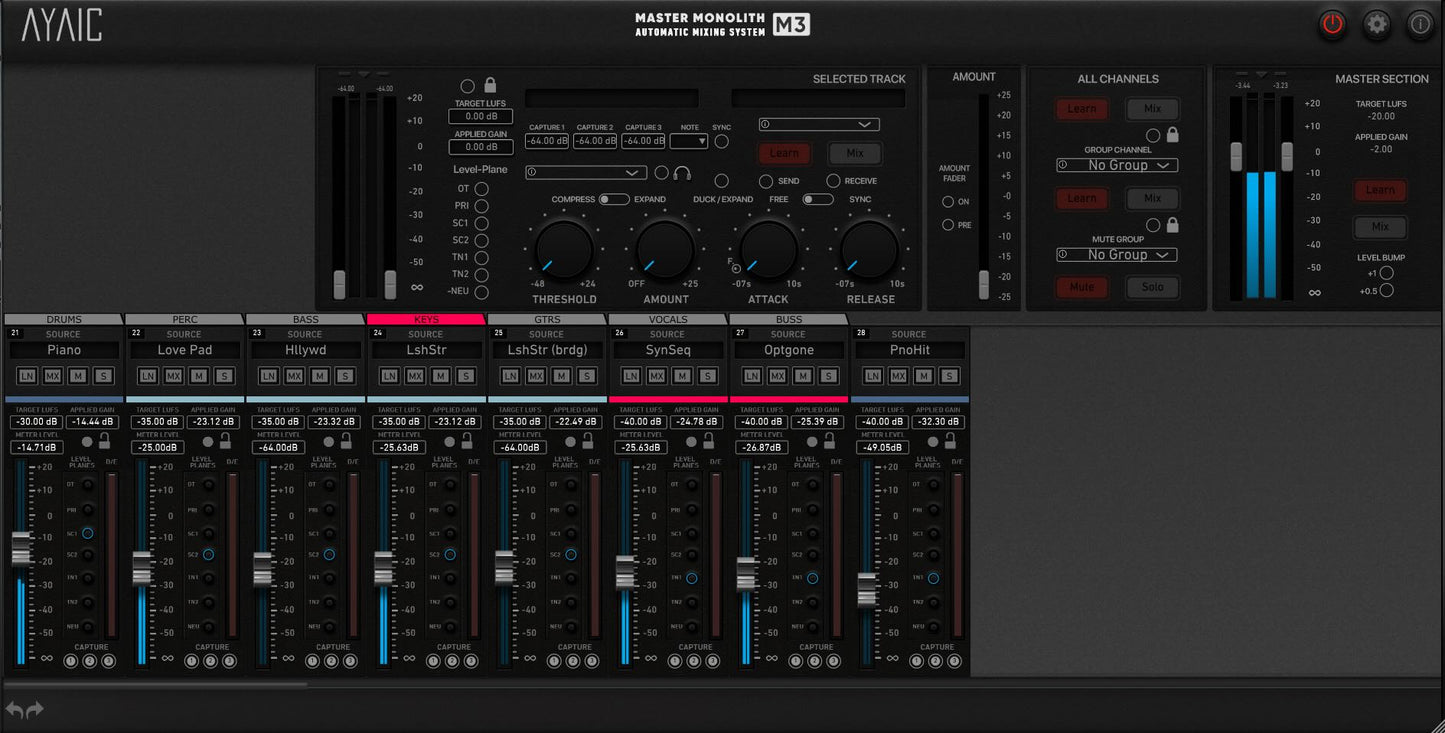
The M3 Master Monolith Mixer v2.0 takes the powerful workflow of Mix Monolith and elevates it into a fully flexible mixing environment designed for modern producers, engineers, and creators.
Built for speed, clarity, and control, M3 delivers a console-style mixing experience inside your DAW, giving you the ability to manage complex mixes with precision while maintaining an intuitive, traditional workflow.
With unlimited channels, advanced automation, and intelligent gain management, M3 helps you shape balanced, professional mixes faster than ever.
Whether you’re producing tracks, mixing full sessions, mastering records, or sketching ideas, M3 adapts to your workflow and scales to any project size.
Powerful Features Designed for Real-World Mixing

The M3 Mixer brings together the best of modern digital mixing with the feel of a professional console, allowing you to focus on creative decisions instead of technical obstacles.
Key features include:
• Unlimited Monolith Channels – Build sessions of any size without limitations
• Unlimited Automation – Automate levels and parameters with precision
• Visual Gain Feedback – Faders display applied gain for instant clarity
• Three Gain Capture Buttons per Channel – Sync to host BPM for dynamic control
• Individual Channel Mute & Solo – Quickly isolate elements of your mix
• Group Learn / Mix / Lock Controls – Manage complex mixes effortlessly
• Global Channel Lock – Maintain consistent settings across channels
• Master Channel Level Bump – Precise adjustments with +0.5dB and +1dB controls
• Undo / Redo – Instantly correct mistakes and experiment freely
• Self Duck / Expansion Feature – Intelligent dynamic control per channel
• Fader Follow Ducking – Natural dynamic movement in your mix
• Expandable Mixer Layout – Scale the interface to match your workspace
• Color & Group Organization – Quickly organize large sessions visually
What’s New in Version 2.0

Version 2.0 introduces powerful enhancements that improve both workflow and flexibility.
New improvements include:
• Numbered Modules for clearer session navigation
• Stable Module Positioning for consistent workflow
• Group Tabs to easily hide or reveal module groups
• Unlimited Color Customization with an expanded palette
• Dedicated Amount Fader with optional pre-fader control
• DAW-Based Module Ordering for better session organization
• Level Plane Button Selection for precise control
• Satellite Controls with Target LUFS, Learn, and Mix functions
• Free-Scale Interface Sizing to fit any screen or workspace
Built for Every Type of Creator

The M3 Master Monolith Mixer is designed for:
• Music Producers
• Mix & Mastering Engineers
• Recording Artists
• Musicians & Songwriters
• Audio Professionals seeking faster workflows
From quick rough mixes to final masters, M3 helps you achieve polished results without slowing down creativity.
Technical Specifications

Supported Plugin Formats
AAX
AU
VST2
VST3
Authorization
AYAIC plug-ins require either:
• iLok2 or iLok3 USB Smart Key
or
• iLok Manager account with an iLok Cloud session
Supported Operating Systems
Mac:
Mac OS 10.10 – 26.0
Intel Core i3 / i5 / i7 / Xeon / Apple Silicon M1–M2
Minimum 2 GHz recommended
Windows:
Windows 7 – Windows 11
Intel Core i3 / i5 / i7 / i9 / Xeon or AMD Quad-Core or newer
System Requirements
Display Resolution: greater than 1280 × 800
Memory: 4 GB RAM minimum
Ceilings of Sound Pro
Ceilings of Sound PRO takes a truly unique approach to equalizing sound and is the first equalizer to incorporate the spectrum of noise as equalization "knobs". 15 user-definable ceiling bands containing 49 noise-slopes each allow you to create sonic-ceiling shapes that drive the settings of a 50/31-band Linear Graphic Equalizer. The EQs operate at 0 latency, low CPU load yet are hi-precision, even at the low frequencies where it really matters.
A "conform spectrum to ceiling" feature conforms your EQ to your ceiling shape with a click of a button. 49 ceiling guides help you balance your ceiling shapes to equalize faster and better than ever. This means whether you're working with one of our hundreds of presets, one of your own created presets or simply manipulating the ceiling shape of your raw audio during mix-down/mastering, perfect equalization is a "click" away. We are certain that once you beginning using Ceilings Of Sound PRO you'll quickly discover why it's called a Hyper-EQ.
"Ceilings Of Sound is a new addition to my plug-in arsenal. It's a very useful tool when I'm dealing with a sonically dense mix." - Butch Vig (Nirvana, Green Day, Garbage, The Foo Fighters, Smashing Pumpkins)

Ceilings Of Sound PRO is optimized for multiple instances during projects with large track-counts and its controls are intuitive, allowing you to quickly adjust crossover & slope parameters or type in values.
<
Features:
Whether you are a producer, mix/mastering engineer, musician or singer/songwriter, Ceilings Of Sound PRO has got you covered with more than 700 presets to breathe new life into your recording, mixing and mastering projects.
- 15 user-definable ceiling bands with 49 noise-slopes each.
- Click-n-drag ergonomics.
- "Auto generate ceiling" function for quick & easy ceiling creation.
- Switchable 50-band/31-band Linear Graphic EQ with 0 latency, lo-CPU, hi-precision.
- "Conform spectrum to ceiling" feature that instantly adheres the equalizer to the ceiling shape.
- 49 Ceiling Guides
- Equalizer is fully automatable using your DAW.
- "Live" function with spectrum smoothing and analyzer average options.
- Metering with infinite hold and click-reset.
- Optimized for multiple instances.
* An iLok account is required to activate your plugin. Click here to register for free.


Satisfaction 100% guaranteed.
Have a question? Welcome To The FAQ Section:
How will I receive my order?
Immediately following checkout, you will receive an email containing your download link(s) & you will always have access to your files.
What do you mean by "works in all DAWs"?
For each release that you download, we provide everything into organized folders (by bpm and tempo) that allow you to quickly find the loops and samples that you're looking for. From there, simply just drag and drop the file into Logic, Ableton, Pro Tools, FL Studio and any other DAW that you might be using.
Yurt Rock products are 100% Royalty-Free. What exactly does this mean?
This means that you can use any of the loops purchased from Yurt Rock in your own songs and you are free to sell the recording commercially without owing us any money. It’s that simple.




Tips & Tricks
View all-
How To Import Kits Into The Roland SPD-SX Pro
The Roland SPD-SX Pro is a powerhouse for drummers, producers, and live performers. With its advanced features and intuitive design, this sampling pad makes it easy to expand your sound...
How To Import Kits Into The Roland SPD-SX Pro
The Roland SPD-SX Pro is a powerhouse for drummers, producers, and live performers. With its advanced features and intuitive design, this sampling pad makes it easy to expand your sound...
-

5 Legendary Live Performances feat. Yurt Rock A...
There's nothing quite as exciting as witnessing world-class musicians performing in a live setting. In this blog post, we'll take a look at 5 different Yurt Rock artists performing in...
5 Legendary Live Performances feat. Yurt Rock A...
There's nothing quite as exciting as witnessing world-class musicians performing in a live setting. In this blog post, we'll take a look at 5 different Yurt Rock artists performing in...
-

Transform Your Drum Beats With Ableton: Convert...
Wondering how to convert audio drum loops to MIDI drum loops? In this Tips and Tricks video, I walk you through this very simple process inside of Ableton using a...
Transform Your Drum Beats With Ableton: Convert...
Wondering how to convert audio drum loops to MIDI drum loops? In this Tips and Tricks video, I walk you through this very simple process inside of Ableton using a...
